

Timeline storage
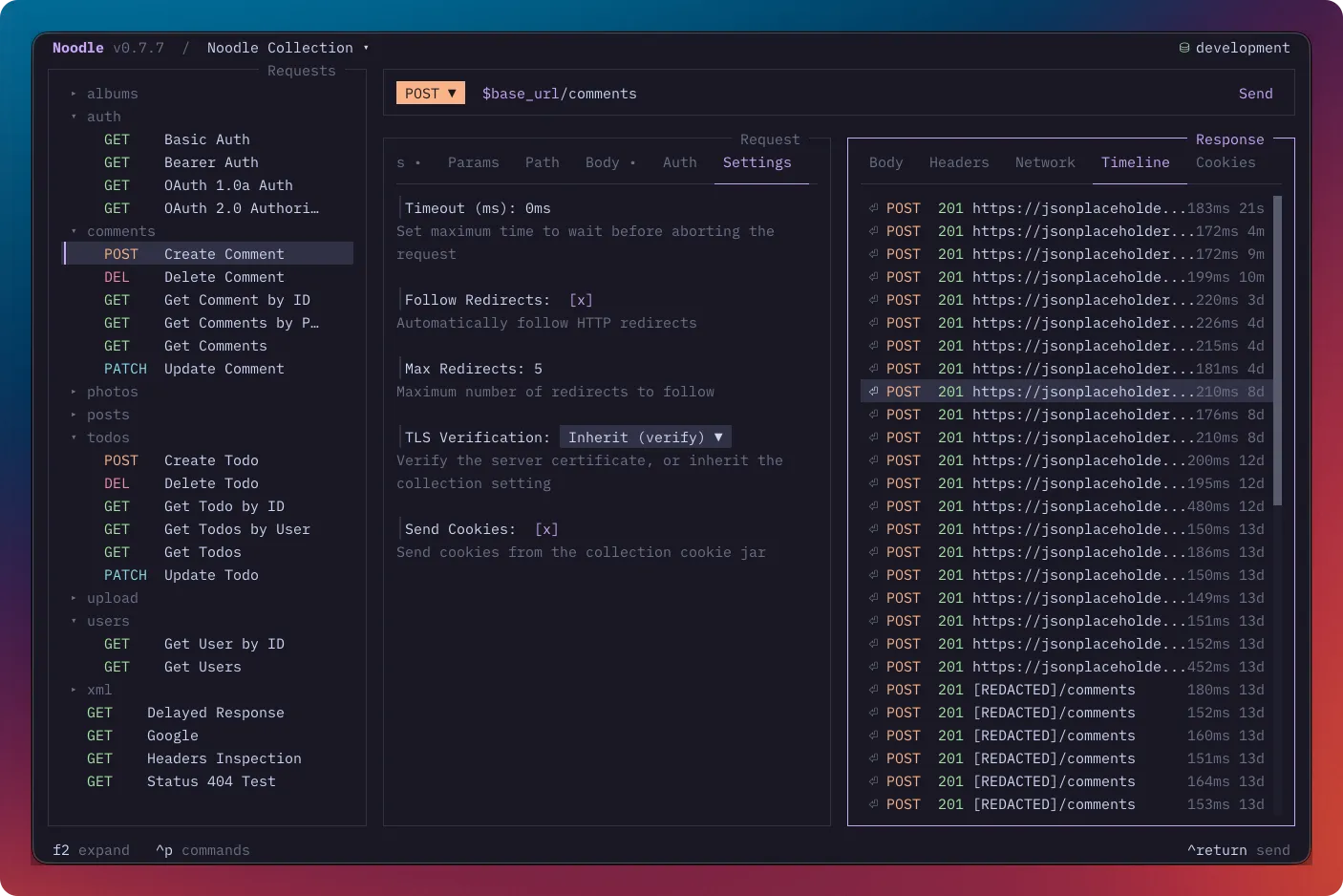
Manual Noodle sends store response history for each request under <collection>/.timeline/.
One file per request, mirroring the request ID structure.
Directory Layout
Section titled “Directory Layout”.collection/├── .timeline/│ ├── get-users.yml # Timeline for request "get-users"│ ├── get-users.yml.bodies/ # Compressed bodies larger than 10 KB│ │ └── <entry-id>-response.gz│ └── users/│ └── login.yml # Timeline for request "users/login"File Format
Section titled “File Format”Each timeline file is a YAML array of entries. Max 50 entries, newest first
(prepended on save). Request and response bodies larger than 10 KB are stored
in a sibling .yml.bodies/ directory as gzip-compressed sidecars, so the full
textual body remains available without bloating the YAML file. Binary responses
retain redacted metadata only, with no body or sidecar. CLI automation and the
TUI Runner do not create timeline entries.
- timestamp: 1783374564216 envName: development request: id: users/get-users name: Get Users method: GET url: https://api.example.com/users headers: {} params: - name: page value: "1" auth: type: inherit response: status: 200 statusText: OK headers: content-type: application/json body: "[...]" timeMs: 56.27 size: 27520Cancelled manual sends show cancelled in Timeline and carry cancelled: true.
If HTTP completed before cancellation interrupted response processing, the
entry retains that response alongside the cancellation error and completed
diagnostics. Cancelled attempts do not affect folder success rates or timing
averages. Legacy entries without the flag remain readable.
Entry Structure
Section titled “Entry Structure”| Field | Type | Description |
|---|---|---|
timestamp |
number | Unix timestamp in ms |
id |
string | Unique entry ID used to name body sidecars |
envName |
string | Active environment name when sent |
cancelled |
boolean | Optional true for an interrupted manual send |
request |
object | Snapshot of the request at send time |
response |
object | Completed HTTP response, including when later processing was cancelled |
error |
object | Error or cancellation data; may coexist with a completed response |
scripts |
object | Optional bounded, redacted pre/post diagnostics, persistence outcomes, origins, and child-call summaries |
tests |
object | Optional bounded, redacted scripted-test results, logs, block errors, and origins |
Response Fields
Section titled “Response Fields”| Field | Type | Description |
|---|---|---|
status |
number | HTTP status code |
statusText |
string | HTTP status text |
headers |
map | Response headers |
body |
string | Text response body, when stored inline |
bodyKind |
string | binary for metadata-only binary history |
contentType |
string | Normalized MIME type for binary responses |
filename |
string | Optional redacted binary filename |
bodyRef |
object | Reference to a gzip sidecar for a body larger than 10 KB |
timeMs |
number | Response time in milliseconds |
size |
number | Response body size in bytes |
Script diagnostics
Section titled “Script diagnostics”The optional scripts: { evaluated, results } group keeps executed phases in
pre/post order, including status, duration, redacted logs/errors, and persistence
outcomes. Blocks include their scope ID, inline/external source kind, declaring
YAML path, and collection-relative JavaScript path when external. Child calls
retain concise summaries without bodies or separate timeline entries. Timeline
details render these with the same expandable Results rows.
Individual diagnostic text and each serialized log array are capped at 10,000
bytes with [TRUNCATED] markers. Script source, capture results, and RunScope
values are excluded. Legacy entries without diagnostics remain readable.
Scripted tests use an optional tests: { evaluated, results, logs, error?, errors?, invocations? }
group. Each result retains name, passed, message, and durationMs, including
completed tests before a later script error. Optional source labels identify
the originating collection, folder, or request file. invocations retains
block diagnostics even when a source declares no tests. errors retains all block
errors and legacy error remains the first error. The same text and log bounds
apply.
Historical Results shows expandable test rows and group diagnostics. Test source
and runtime values are excluded. See Scripted Tests.
Error Fields
Section titled “Error Fields”| Field | Type | Description |
|---|---|---|
message |
string | Error description |
Security
Section titled “Security”New timeline entries resolve ordinary environment variables and redact declared
environment secrets, proxy/TLS secrets, request credentials, OAuth tokens and
signatures, and known captured secrets. Response status text, headers, bodies,
assertion results, script and test diagnostics and logs, network messages, and errors
receive known-secret redaction.
Sensitive headers such as Set-Cookie are masked by field, and body redaction
happens before compression into sidecars. The live response view stays available
for inspection.
The snapshot uses the environment selected when the request was sent. Changing
environments, marking a variable secret, or updating a stored secret does not
rewrite older entries. Clear existing history if it contains data that should
no longer be retained. Unknown server data and public variables can still be
sensitive, so do not commit .timeline/.
Body Sidecars
Section titled “Body Sidecars”When a request or response body exceeds 10 KB, the corresponding body field
is omitted and replaced with a bodyRef:
bodyRef: file: <entry-id>-response.gz encoding: gzip size: 27520The file path is relative to that request’s .yml.bodies/ directory. Noodle
removes sidecars when entries are evicted by the 50-entry limit or when the
timeline is cleared. Treat sidecars as application-managed files.
Useful Queries
Section titled “Useful Queries”Agents and scripts can analyze timeline data:
- Average response time: Exclude entries with
cancelled: true, then sumresponse.timeMs/ response count - Success rate: Exclude entries with
cancelled: true, then count successful responses / completed attempts - Recent errors: Filter entries where
erroris present - Response size trend: Compare
response.sizeacross entries - Environment usage: Which
envNamewas used per entry