

Environments and secrets
Environments let the same request use different URLs and credentials without
editing the request itself. This walkthrough uses the my-api collection from
Your first request.
Create an environment and add a variable
Section titled “Create an environment and add a variable”- Press F3 to open the environment editor.
- Press Ctrl+N, name the environment
staging, choose a color if useful, and save the new environment. - In its variable grid, move to the empty row after the existing variables.
Enter key
BASE_URLand valuehttps://httpbin.org; Tab moves between key and value, and Return commits the edit. - Press Ctrl+S to save the environment and Escape to return to requests.
- Press e, choose
staging, and press Return to activate it.
The header shows the selected environment. New collections created by
collection create already include a development environment, which you can
edit instead of creating another.
Use a variable in a request
Section titled “Use a variable in a request”Set your GET request URL to $BASE_URL/get, save, and send it. With staging
selected, Noodle sends to https://httpbin.org/get. The response contains the
resolved URL. Variable names are case-sensitive.
Variables also work in headers, parameters, bodies, auth fields, file paths,
and assertion expectations. Substitution happens once; $$ sends a literal
dollar sign. See Environment files
for the complete rules.
Store a secret
Section titled “Store a secret”For a protected API, add an API_TOKEN row in the environment editor. Mark the
row as secret with s before entering its value, then save with Ctrl+S.
Use $API_TOKEN in the request’s Auth tab, such as its Bearer Token field.
Use a token only with the API it belongs to, not with the public httpbin example.
Noodle stores the value in the OS credential vault. The environment file keeps only this declaration:
# @secret API_TOKENAPI_TOKEN=Press r on a secret row to reveal or mask its value for the current session. A same-named process environment variable takes precedence over the vault. Known secrets are redacted from diagnostics; ordinary variables remain plaintext.
Set values from the CLI
Section titled “Set values from the CLI”noodle environment set BASE_URL https://httpbin.org --env staging --collection ./my-apinoodle secret set API_TOKEN --env staging --collection ./my-apinoodle secret list --env staging --collection ./my-apisecret set prompts without echo. secret list shows names and resolution
status, not values. For unattended jobs, use a declared secret with a process
environment value as shown in CLI automation and CI.
Select the environment for a run
Section titled “Select the environment for a run”Use the header picker for manual sends and the environment selector in the
Collection Runner. CLI run commands accept
--env; otherwise they use environment in collection settings.yml:
noodle request run example-request --collection ./my-api --env stagingFix a missing value
Section titled “Fix a missing value”If $BASE_URL or $API_TOKEN is unresolved, confirm the selected environment,
exact key spelling, enabled state, and saved changes. A secret declaration alone
does not provide a value: set it in the vault or supply its process environment
variable. See Troubleshooting
for headless and keyring errors.
Cycling
Section titled “Cycling”Press Ctrl+U to cycle through available environments. The active
environment shows in the header with a color marker.
Press e, or click the environment in the header, to open a searchable picker. Type to filter environment names and press Return to activate the highlighted environment.
Environment Editor
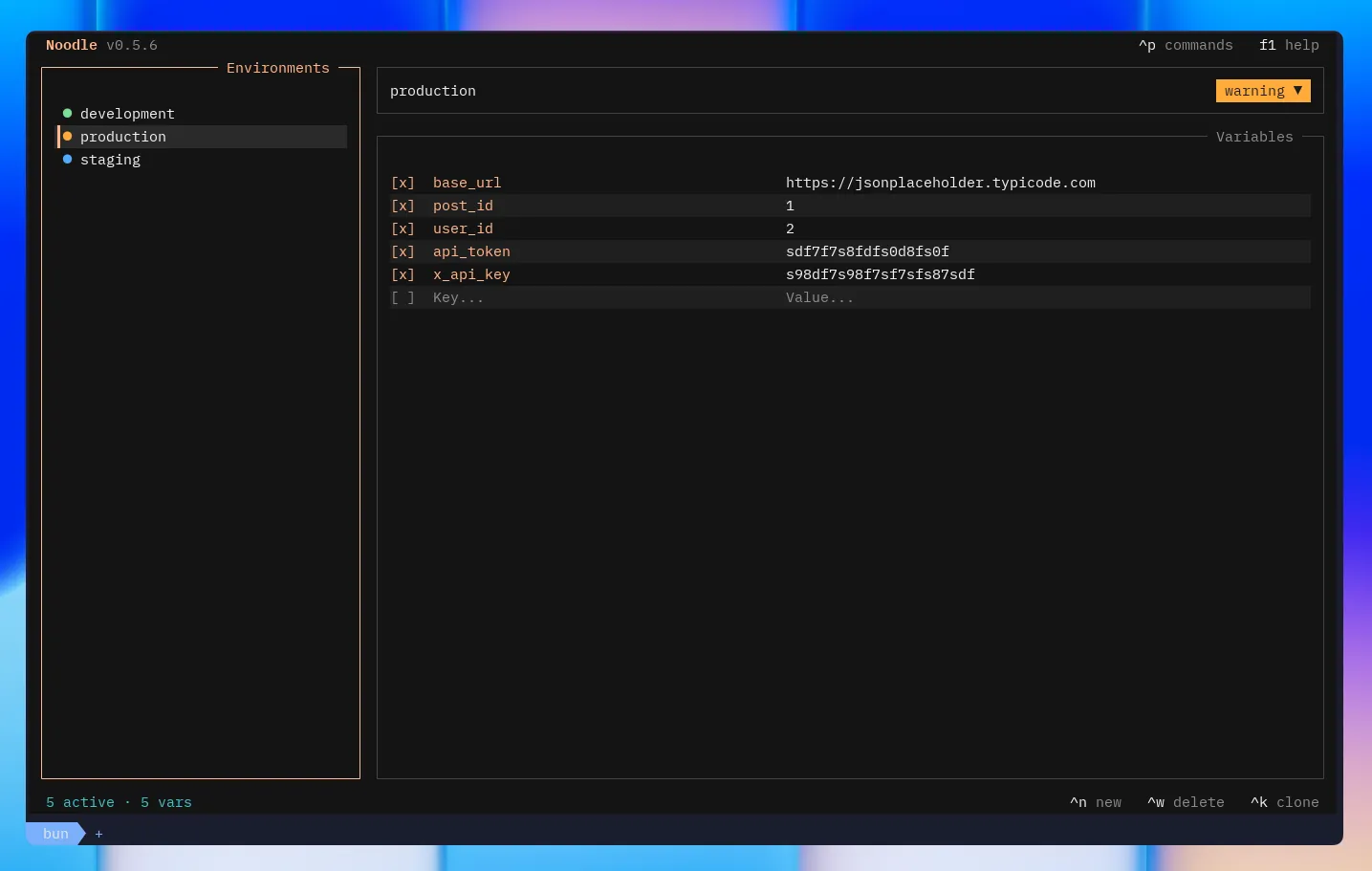
Section titled “Environment Editor”Press F3 to open the full environment editor. The TUI splits into three sections:
- Sidebar (left): lists all
.envfiles with color dots and unsaved indicators - Header (top): edit name and pick a color badge
- Main: key/value grid
Keybindings
Section titled “Keybindings”All env editor actions are also available in the command palette (Ctrl+P)
when the env editor is open.
| Key | Action |
|---|---|
| ↑/↓ | Navigate rows or sidebar items |
| Return | Edit field or select environment |
| Tab | Switch between key and value columns |
| Space | Select/activate environment |
| Ctrl+D | Delete current variable row |
| s | Toggle secure storage for the selected variable |
| r | Reveal or mask the selected secret for this session |
| Ctrl+S | Save environment |
| Ctrl+N | Create an environment with a name and optional color |
| Ctrl+K | Clone selected environment |
| Ctrl+W | Delete environment (with confirmation) |
| Escape | Return to main view |
Features
Section titled “Features”- Dirty tracking: unsaved changes show a yellow bullet
- Color badges: 17 theme colors available
- Searchable picker: filter and activate environments without opening the editor
- Create form: validate a new name and choose its color before saving
- Disable variables: checkbox toggles a
#prefix - Secure values: mark a row
[secret]; Noodle stores its value in the OS credential vault and keeps only a blank declaration in the.envfile - Secret sources: a same-named process environment variable takes precedence over the vault; missing secrets are highlighted
- Clone: appends “ - Copy“ to the name, then asks whether to copy stored values or only the secret declarations
- Context menu: right-click an environment in the sidebar to save, create, clone, or delete environments