

Layout and navigation
Use Tab to move focus, Return to edit a field, Escape to leave it, and Ctrl+P to find an action in the command palette. F1 opens keyboard help. Start with Your first request if you have not opened a collection yet.
The main Noodle view has four panes:
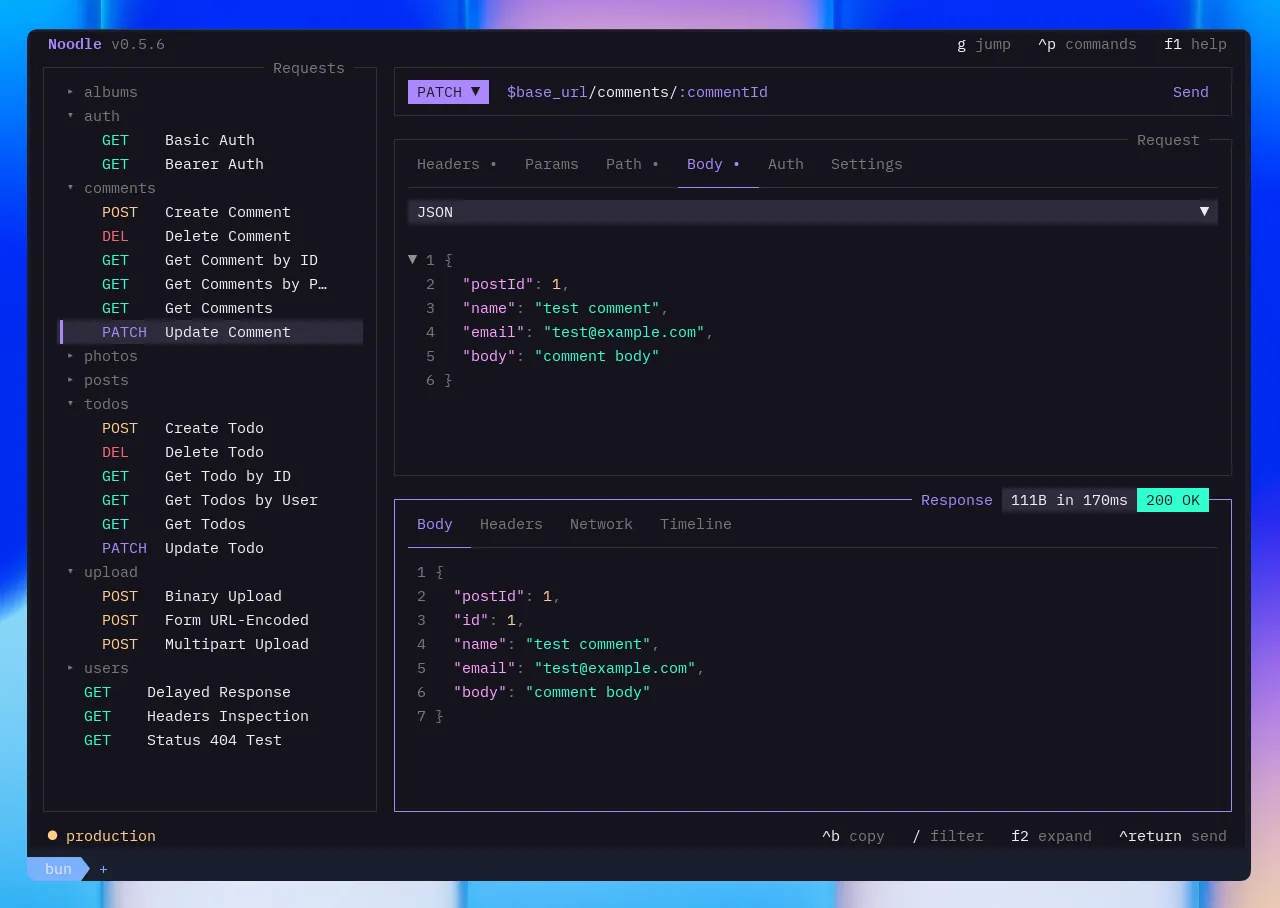
| Pane | Description |
|---|---|
| Sidebar | Collection tree with folders and requests |
| URL bar | Edit the method and URL. Tab switches between them; Send runs the request. |
| Request | Request detail view with inline editing |
| Response | Response rendering (idle / sending / done / error) |
Press Tab / Shift+Tab to cycle focus through sidebar → URL bar →
request → response. The active pane gets a cyan border with a ▸ prefix in
its title. When the URL bar is focused, Tab cycles between the HTTP
method selector and the URL text field. Folder view has sidebar and folder
panes; the environment editor has environment sidebar, header, and variable
panes; and the cookie jar has domain sidebar and cookie list panes.
Layout Modes
Section titled “Layout Modes”Press Ctrl+L to toggle between:
- Stacked: panes stack vertically
- Side-by-side: request and response split horizontally
Press F2 to expand the focused pane to full width.
Resize with the mouse
Section titled “Resize with the mouse”Drag the divider after the sidebar to change the collection tree width. Drag the boundary between the request and response panes to divide the remaining space. The boundary moves vertically in stacked mode and horizontally in side-by-side mode.
Each layout keeps its own request/response proportion for the current session. Double-click the sidebar divider to restore its default width, or double-click the request/response divider to return to an even split. Noodle adjusts minimum pane widths when the terminal becomes narrow, then restores the preferred sizes when space returns.
Editing
Section titled “Editing”The request pane has two editing modes:
- Field browse: navigate between fields with arrow keys
- Edit: modify a field value (enter via
Return, exit viaEscape)
When the collection directory is read-only (browse or empty mode), the request pane is view-only. Initialize the directory from the command palette to enable editing.
Status Bar
Section titled “Status Bar”The footer bar runs along the bottom of the TUI and shows three segments:
- Left: active environment name with its configured color badge
- Center-right: keyboard shortcut hints – only the most-used actions are shown, and hints adapt to terminal width by hiding when space is tight
- Far right:
Noodle v{version}branding in the primary color
Shortcut hints use your custom keybindings from
~/.config/noodle/keybinds.yml. The send, save, palette, jump, and help
keys always appear; narrower terminals drop additional hints while keeping
the branding visible.