

Authentication
Authentication can live on one request or flow down from a folder. In either case, keep credentials in environment variables and declare sensitive values as secrets so collection files stay safe to share.
Authenticate a request
Section titled “Authenticate a request”Open a saved request and select an environment
containing your credentials. In the request’s Auth tab, choose the scheme
required by the API and fill its fields with variables such as $API_TOKEN.
Save with Ctrl+S, then send with Ctrl+Return.
Check the response status and the Network tab for authentication events.
A 401 or 403 usually requires checking the token, permissions, or selected
environment. For shared auth, configure the folder’s Auth tab and set child
requests to inherit. The sections below describe each supported scheme.
auth: inherit uses its nearest folder's auth. Explicit request auth replaces the folder setting, while auth: none opts out. Secret values remain outside shareable collection files.Auth Types
Section titled “Auth Types”Choose an auth type from the request or folder Auth tab. Use environment
variables for credentials so the same request works across environments, and
declare sensitive values with # @secret NAME plus a blank placeholder so the
real value lives in the OS credential vault.
Bearer Token
Section titled “Bearer Token”auth: type: bearer token: $api_tokenBasic Auth
Section titled “Basic Auth”auth: type: basic user: $username pass: $passwordOAuth 1.0a
Section titled “OAuth 1.0a”auth: type: oauth1 consumer_key: $oauth1_consumer_key consumer_secret: $oauth1_consumer_secret access_token: $oauth1_access_token access_token_secret: $oauth1_access_token_secret signature_method: HMAC-SHA256 placement: headerNoodle supports HMAC-SHA1/256/512, RSA-SHA1/256/512, and PLAINTEXT
signatures. Place OAuth parameters in the header, query, or a URL-encoded
body; body placement is unavailable for other body types. RSA private keys
may be inline text or collection-relative and @/ file paths. Optional body
hashes do not support multipart bodies.
Blank nonces and timestamps are generated for each signing operation. Noodle signs each allowed same-origin redirect leg again and strips OAuth credentials when the origin changes. PLAINTEXT is accepted only over HTTPS or loopback HTTP. Keep consumer secrets, token secrets, and private keys in secret environment variables.
OAuth 2.0
Section titled “OAuth 2.0”auth: type: oauth2 grant_type: authorization_code authorization_url: https://identity.example.com/oauth/authorize access_token_url: https://identity.example.com/oauth/token refresh_token_url: https://identity.example.com/oauth/token client_id: $oauth2_client_id client_secret: $oauth2_client_secret scope: openid profile redirect_uri: http://127.0.0.1:8765/oauth/callback pkce: true pkce_method: S256 token_placement: headerSupported grants are authorization code, client credentials, implicit, and
password. Authorization code defaults to S256 PKCE. Implicit, password, and
plain PKCE remain available for compatibility, but new integrations should
prefer authorization code with S256 PKCE. OAuth endpoints require HTTPS except
on loopback hosts, and browser callbacks use a loopback HTTP URL ending in
/oauth/callback.
TUI sends can open the system browser for authorization code and implicit
flows. Open the command palette with Ctrl+P to fetch or authorize, copy, or
clear the selected request’s OAuth 2 token. Non-interactive commands never open
a browser: they may reuse or refresh stored browser credentials, while client
credentials and password grants may fetch a token directly.
Token responses live in the OS credential vault. If the vault is unavailable, Noodle keeps them in memory for the current session and reports a warning; it never writes plaintext OAuth tokens, authorization codes, PKCE verifiers, or generated state to request YAML. OAuth 2 also supports signed client assertions, access or ID token delivery, header or query placement, and custom authorization, token, and refresh parameters. See Collection YAML for the full field schema.
Discover endpoints with OIDC
Section titled “Discover endpoints with OIDC”Use Discovery URL in the request or folder Auth editor to fill missing authorization and token endpoints:
auth: type: oauth2 grant_type: client_credentials discovery_url: https://identity.example.com client_id: $oauth2_client_id client_secret: $oauth2_client_secret scope: read:usersDiscovery URL Type defaults to issuer. Noodle accepts an issuer or its
standard /.well-known/openid-configuration URL and checks the returned issuer.
For a provider with a custom metadata path, choose document:
discovery_url: https://identity.example.com/metadata/oidc.jsondiscovery_url_kind: documentDocument mode requests the exact URL. Explicit Authorization URL and Access Token URL values take precedence; an empty refresh URL uses the token endpoint. Discovery uses the request’s proxy and TLS policy, requires HTTPS except on loopback hosts, and never changes the saved endpoint fields.
OpenAPI supports discovery through openIdConnect. Postman needs explicit
endpoints for the selected grant. See Collection Export
for conversion limits.
NTLMv2
Section titled “NTLMv2”auth: type: ntlm username: $ntlm_username password: $ntlm_password domain: CONTOSO workstation: build-agentdomain and workstation are optional. Noodle supports the server’s
connection-bound NTLMv2 challenge exchange; it does not support proxy NTLM,
NTLMv1, Kerberos/SPNEGO negotiation, signing, sealing, or channel binding.
Declare $ntlm_password as a secret environment value.
API Key
Section titled “API Key”auth: type: api_key key: X-API-Key value: $api_key placement: headerplacement can be header or query.
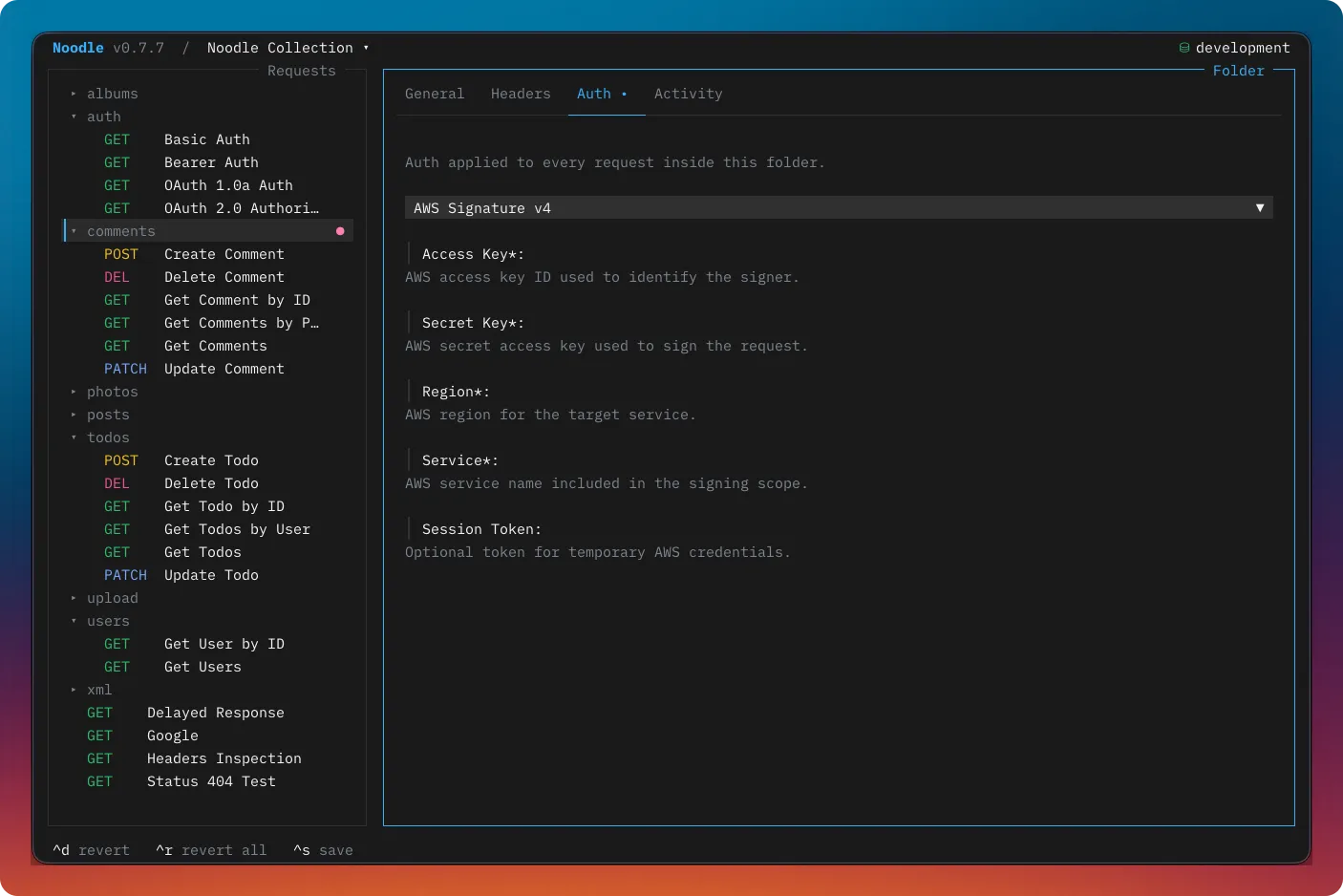
AWS Signature Version 4
Section titled “AWS Signature Version 4”auth: type: aws_sigv4 access_key: $aws_access_key_id secret_key: $aws_secret_access_key region: us-east-1 service: execute-api session_token: $aws_session_tokensession_token is optional. Noodle signs the request after environment
substitution and supports text, JSON, URL-encoded, and binary bodies. Multipart
bodies are not supported because their runtime-generated boundary and bytes
cannot be signed reliably in advance. Declare the secret key and session token
as secure environment values.
Generated client code
Section titled “Generated client code”The Generate Code command is unavailable for NTLMv2, AWS SigV4, OAuth 1.0a, and OAuth 2.0 requests. NTLM requires a connection-bound challenge exchange, SigV4 and OAuth 1 signatures are request-specific, and OAuth 2 tokens use external secure state. Keep these requests in a collection and run them with Noodle instead.
Inheritance
Section titled “Inheritance”Auth can be defined on a folder or a request. A request with type: inherit
uses the nearest parent folder’s auth configuration. Request auth overrides
folder auth; use type: none to opt out for one request.
See Folders and inheritance for the interactive workflow and Collection YAML for the canonical auth field schema.
Disabling Auth
Section titled “Disabling Auth”auth: type: none