

Collection Runner
Run a group of saved requests without leaving the terminal interface. You need an initialized collection with requests, and an environment if they use variables. Save pending request and folder changes before starting.
Configure a run
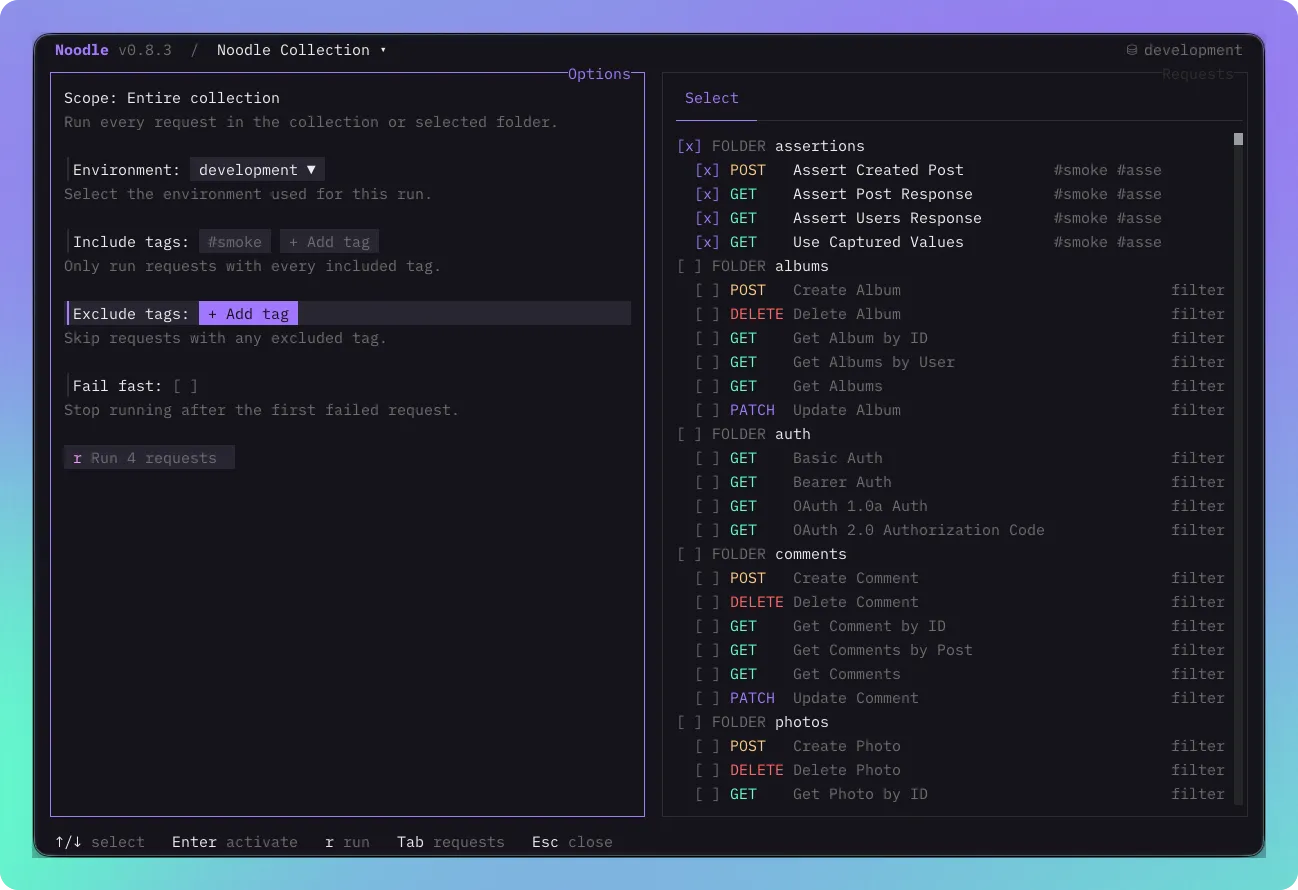
Section titled “Configure a run”- Press F5, or open Ctrl+P and choose Run Collection.
- Select the requests or folders to include. A folder includes its descendants.
- Choose the environment. Add Include or Exclude tags to narrow the selection.
- Enable Fail-fast if later requests should stop after a failure. Set a delay in milliseconds if the API needs time between requests.
- Optionally enter a CSV or JSON Data file path and check the iteration count.
- Choose Run to start. Inspect the ordered results as they arrive.
A folder’s context menu opens the Runner scoped to that folder. Selection uses
collection order. Within each directory, folders come first, ordered by their
meta.seq when set, then by name. Requests follow, ordered by their display name.
For a sequence such as create then fetch, prefix request names with 01 and 02
to make the intended order explicit. See Collection YAML.
Filter with tags
Section titled “Filter with tags”Request tags and tags inherited from non-root folders form dynamic suites. Include tags must all match; any matching Exclude tag removes a request. Exclusion wins. Tags are case-sensitive. A selection with no matching requests cannot run. See CLI tag examples for the same selection rules in scripts.
Inspect results
Section titled “Inspect results”The Runner shows progress and a result for each executed request. Expand a request to inspect its response and script, capture, assertion, and test outcomes. Details include Console when logs are available. Before HTTP, the TUI Runner checks the syntax of applicable scripts and tests for all selected requests without executing them during validation. With fail-fast enabled, later selected requests are recorded as skipped after all available diagnostics for the failed request finish.
Share values within a run
Section titled “Share values within a run”Captures and script writes can pass values to later requests in the same run. Each new run starts with a fresh scope. The Runner keeps those values transient even when a request declares persistence.
Runner options and results belong to this workspace. They do not create a new runner file, edit request declarations, or write timeline entries. Binary responses retain metadata only in Runner details.
Run the same collection from the CLI
Section titled “Run the same collection from the CLI”noodle collection run ./my-api --env developmentUse CLI automation and CI for targets, tags, JSON output, exit statuses, and GitHub Actions. Add response assertions to make a run check behavior rather than just send HTTP requests.
CSV and JSON iteration data
Section titled “CSV and JSON iteration data”noodle collection run ./my-api --data ./data/users.csvnoodle collection run ./my-api users/ --data ./data/users.json --tag smoke --delay 100 --fail-fast --json--data is optional and independent of the --json output flag. In F5, enter
the optional Data file path, check the iteration count, and select Run.
Relative CLI paths start at the current directory; relative F5 paths start at
the collection root. Both accept absolute paths. The F5 field also completes
paths and accepts @/ for your home directory. F5 revalidates at run start.
The path and results are temporary Runner options.
CSV uses a header row as variable names and keeps cells as strings, including quoted commas and multiline fields; a UTF-8 BOM is accepted. JSON requires a non-empty array of objects and preserves JSON value types:
[{ "user_id": 1, "active": true }, { "user_id": 2, "active": false }]The entire file is validated before requests are sent. Empty files, invalid or unsafe variable names, duplicate CSV headers, and inconsistent CSV rows fail. Names use letters, digits, or underscores. Limits are 5 MiB per file, 1,000 rows, and 10,000 selected request executions. Rows must fit the existing 256 KiB/depth-32 bridge limits, including the iteration wrapper.
Each row runs every selected request in collection order. Its variables
override environment values for $name substitution and noodle.run.get;
successful captures and scripts can replace them during that iteration.
noodle.env.get continues to read the original environment snapshot.
noodle.iteration is deeply read-only { index, count, data }, with zero-based
index and the original row in data. It is null without data and is shared
with child requests. JavaScript objects in data retain their JSON types.
Each row starts with fresh variables and an in-memory copy of the same initial
cookie jar. Cookies change within that row only and are never persisted.
Fail-fast skips every remaining request and row. Delay applies between all
consecutive executions, including row boundaries. Results, skips, and details
carry zero-based iteration; the collection result adds iterations. F5 groups
results by iteration and counts progress across all executions. Human labels
show iteration numbers starting at one. Datasets themselves are not included
in results or history.
Exit codes remain 0 for success, 1 for execution/response validation failure,
and 2 for configuration or invalid data. Without --data, behavior and result
shapes remain unchanged.