

Capture and reuse values
Use a capture when one response supplies an ID, token, or other value needed by another request. Start with a saved request and an initialized collection.
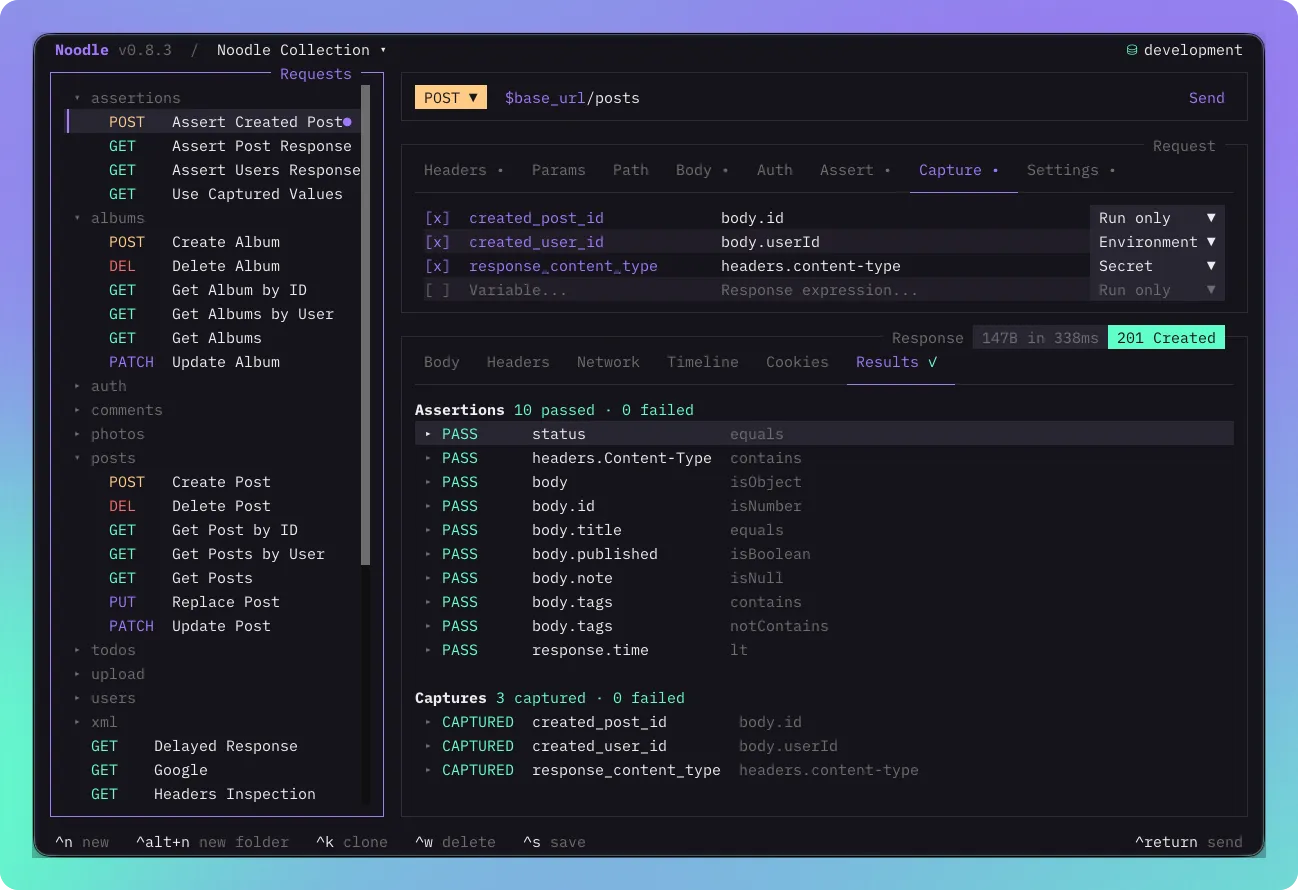
Add a capture in the TUI
Section titled “Add a capture in the TUI”- Select the request that returns the value and open its Capture tab. If hidden, reveal it from the + menu at the right of the request tabs.
- Add a variable name such as
created_user_idand a response expression such asbody.id. Expression completion can use the latest response. - Choose Run only, Environment, or Secret, then save with Ctrl+S.
- Send the request and inspect Response → Results. A successful capture shows its type and value, with known secrets redacted.
Use Space to disable a selected capture without removing it from the file.
Pass a value to the next request
Section titled “Pass a value to the next request”Save these as two separate files inside the same collection. Replace the example
API URL with your server. The create endpoint must return JSON containing id.
In users/create.yml:
name: Create Usermethod: POSTurl: https://api.example.com/usersbody_type: jsonbody: '{"name":"Noodle example"}'capture: created_user_id: value: body.idIn users/get.yml:
name: Get Created Usermethod: GETurl: https://api.example.com/users/$created_user_idOpen the Collection Runner with F5 and select both requests, or run their folder:
noodle collection run ./my-api users/The create request runs first and captures id; the next request substitutes
it into its URL. Two separate manual sends do not share transient captures.
Choose how long to keep a value
Section titled “Choose how long to keep a value”| Choice | Manual send or request run |
Runner or collection run |
|---|---|---|
| Run only | Available to the same request’s post script, then discarded | Available to later requests until the run ends |
| Environment | Save a public value to the selected environment | Keep transient; persistence is suppressed |
| Secret | Save to the OS vault with a blank environment declaration | Keep transient; persistence is suppressed |
For later manual sends, select an existing environment and use Environment for public IDs or Secret for tokens. For example:
capture: access_token: value: body.access_token persist: secretThe original captured value is persisted even if a later post script overwrites it or fails. Secret captures and values from sensitive response headers are fully redacted in results.
Understand failures and replacement
Section titled “Understand failures and replacement”Captures read status, response time, headers, or JSON body paths. Binary bodies cannot supply JSON paths. Successful captures commit before post scripts and assertions, including on HTTP error responses. The latest successful write wins over the environment or an earlier run value.
A missing or invalid path fails that capture without replacing an earlier value. Other successful captures remain committed. A failed capture fails the request; the collection continues unless fail-fast is enabled. Persistence failures keep the HTTP response available and are reported in Results.
See capture syntax and constraints for the full schema. Use response assertions to check the returned value, or a post script when extraction needs conditions or transformation.