

Scripting
Inline scripts and external JavaScript files handle synchronous or async preparation and conditional response processing that saved fields, variables, and captures cannot express. Use pre for signatures, timestamps, test data, and request mutations; use post to process a completed response after captures and before assertions.
For copyable examples, browse the Cookbooks for request preparation, response processing, testing, and request chaining.
Author scripts in the TUI
Section titled “Author scripts in the TUI”Open the request or folder + menu and reveal Pre Script, Post Script, or Tests. Tabs with saved source are already visible. Press Return to edit inline JavaScript and Ctrl+S to save request or folder changes. For shared collection code, open F4 → Collection → Scripts; its drafts save when you leave the editor or change phases.
The code editor provides highlighting, folding, completion, parameter help, and diagnostics. Ctrl+Space requests assistance; Ctrl+Alt+F formats inline code. Semantic diagnostics are advisory. TUI Send and Runner check the syntax of applicable scripts and tests before HTTP without executing them during the check. CLI runs keep their existing runtime validation and execution behavior.
Choose External file to enter a collection-relative ./path/to/file.js.
The path field completes directories and .js files. Ctrl+Alt+X, or
Open Script in External Editor in the command palette, validates and opens
that file using the editor selected in global Behavior settings. Noodle does
not create or rewrite external script files. Switching a non-empty source
between inline and external modes asks before discarding it.
On a request script tab, use Ctrl+Alt+R or Show Script Execution Order to inspect the active phase’s collection, folder, and request sources in execution order. g then d, f, or j jumps to the corresponding script or test tab when visible.
Migrate existing scripts
Section titled “Migrate existing scripts”Noodle 0.9.1 moves every Noodle API under the frozen noodle namespace. Change
request.headers.set(...) to noodle.request.headers.set(...), and prefix
response, env, run, crypto, random, and cookies API accesses the same
way. Bare API globals are unavailable. console and JavaScript built-ins such
as Date, JSON, and Math remain global.
When to use a script
Section titled “When to use a script”Prefer declarative request fields and $VARNAME substitution when they are
enough. Use scripts.pre when the outgoing request needs computed values or
coordinated mutations immediately before HTTP.
Scripts are a good fit for:
- signing a request body with a secret key;
- adding a timestamp, nonce, or digest;
- transforming a JSON body before sending;
- changing prepared authentication or query parameters; and
- sharing a transient RunScope value with a later request.
Use captures to pass
response values forward and
assertions
to check a response. Those jobs do not need scripting. Use scripts.post for
conditional processing after captures and before assertions. Use
Scripted Tests for programmable response checks
with test() and expect() after assertions.
Add a pre-request script
Section titled “Add a pre-request script”Add a string-valued pre member under the request’s top-level scripts field:
name: Create signed eventmethod: POSTurl: $base_url/eventsbody_type: jsonbody: '{"name":"deploy"}'scripts: pre: |- const timestamp = new Date().toISOString(); noodle.request.body.setJson({ ...noodle.request.body.json(), timestamp }); noodle.request.headers.set("X-Timestamp", timestamp); noodle.request.headers.set( "X-Signature", noodle.crypto.hmacSha256(noodle.env.get("SIGNING_SECRET"), noodle.request.body.text(), "hex"), ); noodle.run.set("temporary_nonce", noodle.crypto.randomBytes(12, "base64")); console.info("prepared", timestamp);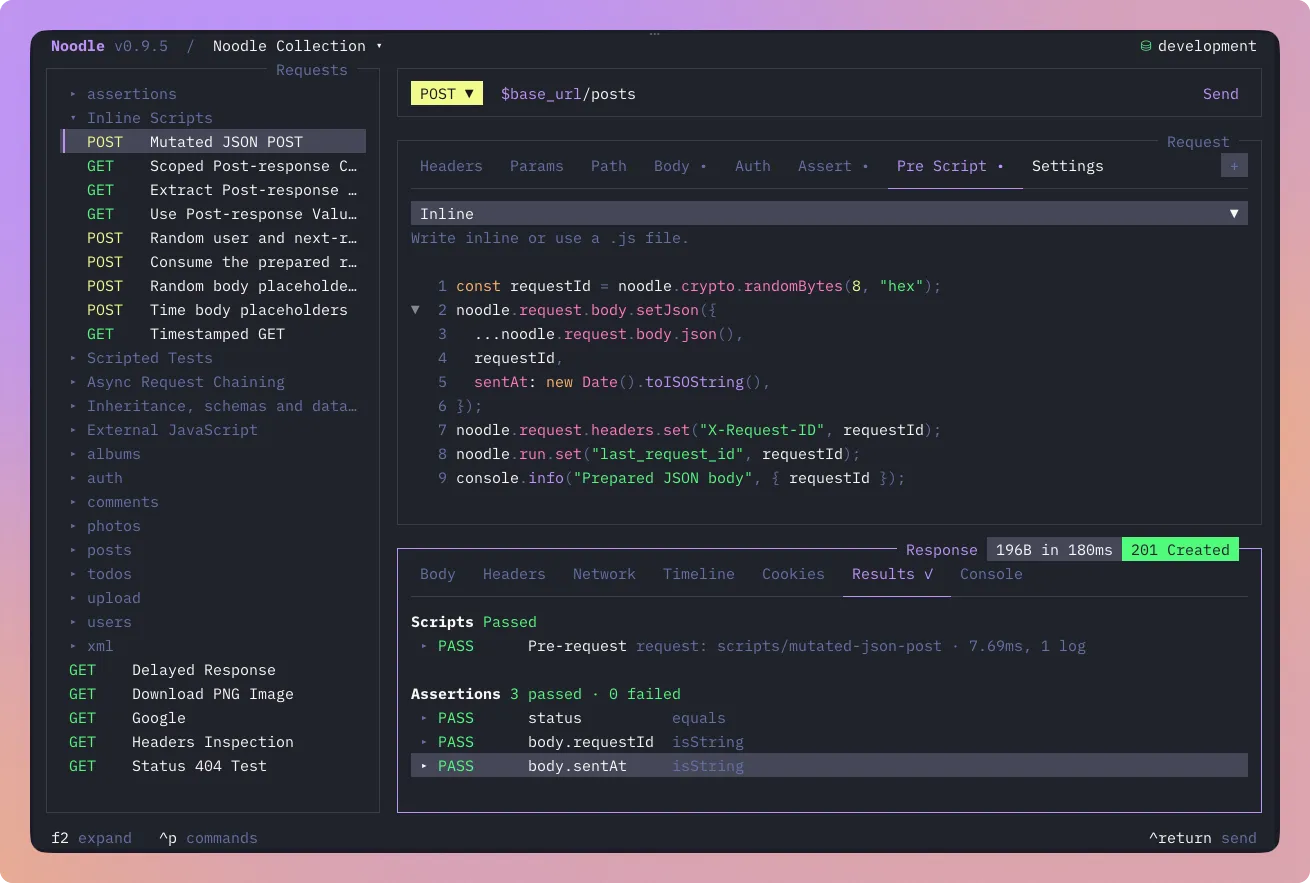
Use the Pre Script tab, edit request YAML directly, or open the YAML editor
with Ctrl+Alt+E. Script source is literal and does not receive $VARNAME
substitution.
An optional post string can accompany pre or stand alone. Empty strings are
valid no-ops and are omitted when serializing YAML. Empty mappings, unknown keys,
non-string sources, and malformed external paths are rejected.
External JavaScript files
Section titled “External JavaScript files”Move reusable code into .js files and reference them from request YAML,
collection settings.yml, or a nested folder.yml:
scripts: pre: ./scripts/prepare.js post: ./scripts/process.jstests: ./scripts/check-response.jsPaths always start at the collection root, even from a nested request or
folder. A reference must begin with ./, end with .js, and use forward
slashes. Absolute paths, .., empty or . segments, backslashes, and NUL bytes
are rejected. Files must be readable, valid UTF-8, regular files of at most
256 KiB. Symlinks within the collection are supported; escapes are rejected.
For example, scripts/check-response.js can contain:
test("request succeeded", () => { expect(noodle.response.status).toBe(200);});A manual send or request run loads every applicable pre/post/test source
before the first pre script. Collection runs and the F5 Runner preflight every
selected request before any HTTP. Missing or invalid sources are configuration
failures (CLI exit 2). Dynamically called saved children resolve their own
sources before their pre scripts. Unselected requests do not block a run unless
called this way.
File reads are shared within one run, including dataset rows and saved children;
the next manual send reads current contents. Files use the same sandbox as
inline code, with no import, require, module loading, or filesystem access.
You can mix file references and inline blocks. See the
external-script sample collection
for preparation, response processing, inherited hooks, tests, and chaining.
Available APIs
Section titled “Available APIs”The sandbox exposes the following APIs:
| API | Purpose |
|---|---|
noodle.request |
Read the prepared request; mutate it in pre only |
noodle.env |
Read the selected-environment snapshot |
noodle.run |
Read RunScope values; pre/post may set or remove them, with optional persistence |
noodle.crypto |
Create SHA-256, HMAC-SHA256, and random-byte values |
noodle.random |
Bounded English test-data generators with per-invocation seeds |
noodle.time |
Timestamps, ISO parsing, timezone formatting, and elapsed durations |
noodle.response |
Post and tests: status, status text, timing, headers, text, and cached JSON |
noodle.cookies |
Final-URL-scoped get/set/delete in post; read-only get in tests, when available |
console |
Record bounded log, info, warn, and error messages |
See the Script API reference for every method, accepted value, and fixed resource limit.
Execution order
Section titled “Execution order”Every manual send, request run, collection run, and TUI Runner request uses
the same order after source preflight:
- Apply folder overrides.
- Resolve the environment and current RunScope values.
- Substitute request variables and body templates once.
- Run pre blocks from collection to request.
- Send the prepared request.
- Evaluate captures.
- Run post blocks from collection to request against the response and committed captures.
- Evaluate assertions, including after post failure.
- Run inherited and request
tests, including after HTTP, capture, post, or assertion failure.
Pre stages request and RunScope mutations until complete success. If pre throws or exceeds a limit, Noodle discards its changes and does not send HTTP. Successful request mutations remain in memory and are never written back to YAML.
Successful noodle.run.set values become available to later requests in the same
ordered collection run, even when transport or response evaluation later fails.
Manual sends and request run use a fresh scope.
Process a response
Section titled “Process a response”scripts: post: |- if (noodle.response.status === 201) { noodle.run.set("event_id", noodle.response.json().id); console.info("created event"); }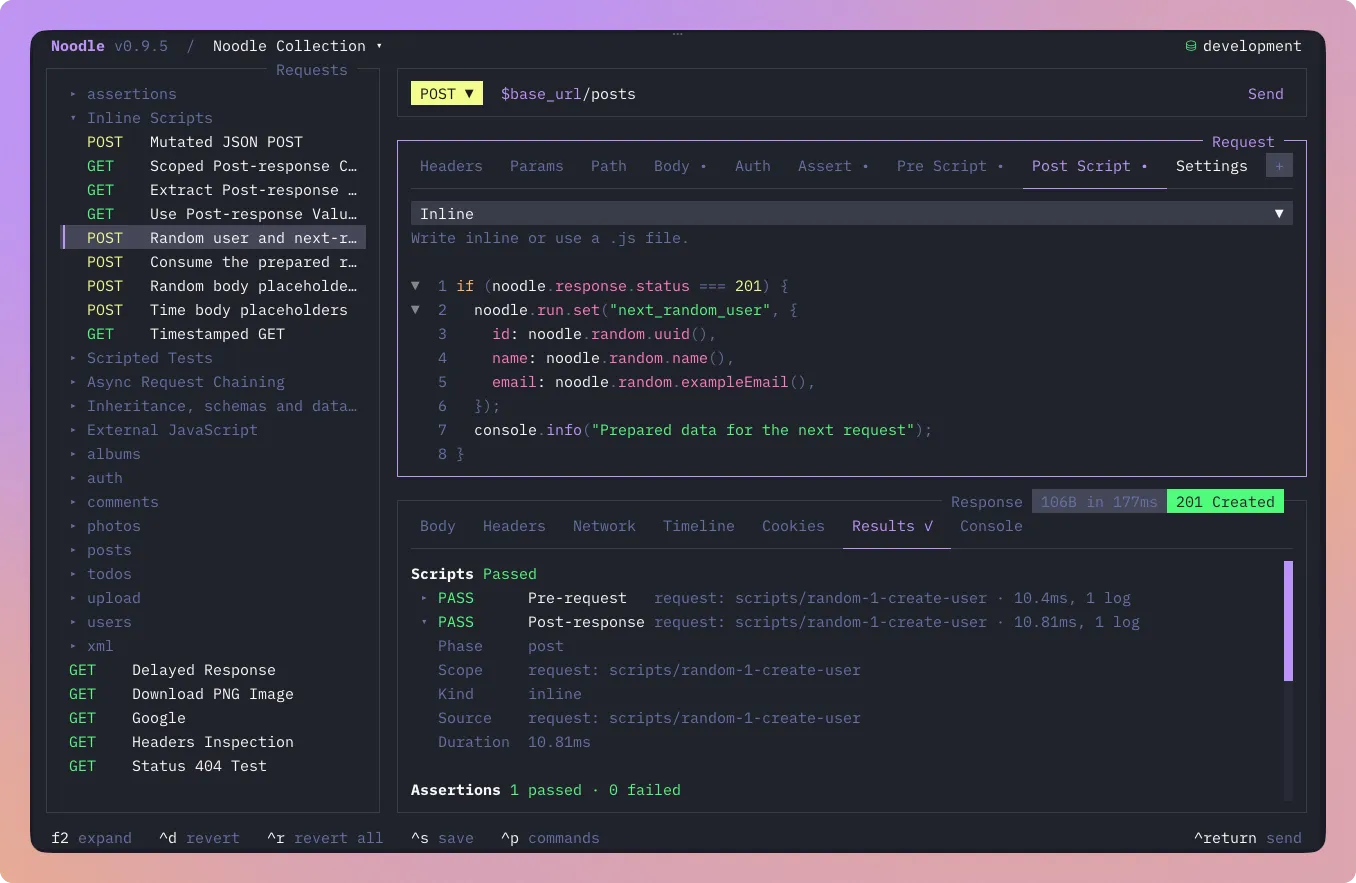
Post runs once per completed HTTP response, including HTTP/capture failures, but not transport failures or intermediate redirects/authentication challenges. Request readers reflect the final prepared HTTP leg after signing and cookie/header preparation; every request mutator throws a read-only API error. Post failure discards only its staged RunScope/cookie changes, preserving the response, captures, earlier writes, and logs. Assertions and scripted tests still run. Successful post values reach later collection requests even when assertions fail.
noodle.response exposes status, statusText, timeMs, case-insensitive
headers.get/has, lazy text(), and cached json(). Missing headers return
null; invalid JSON throws a structured API error. Body readers have a separate
5 MiB UTF-8 cap; extracted RunScope values retain 256 KiB/depth-32 limits.
When cookies are enabled and available, post also exposes
noodle.cookies.get(name), set({ name, value }), and delete(name). These
operations are scoped to the final URL; cookies are host-only and domain is
rejected. Cookie and RunScope changes commit together after complete validation,
with deferred cookie persistence. sendCookies: false removes the capability
but still processes response Set-Cookie. See the reference for exact attributes.
Save environment and secret values
Section titled “Save environment and secret values”Both phases can persist or delete selected values:
noodle.run.set("BASE_URL", "https://api.example.com", { persist: "environment" });noodle.run.set("ACCESS_TOKEN", token, { persist: "secret" });noodle.run.unset("BASE_URL", { persist: "environment" });noodle.run.unset("ACCESS_TOKEN", { persist: "secret" });Manual sends and request run honor these options for an existing selected
environment. Collection runs and the Runner keep them transient and report
suppression. Without options, writes remain transient. noodle.env.get keeps
its initial snapshot; noodle.run.get sees staged or committed scope writes.
Persistent unset hides the baseline for the remaining run until another
successful set or capture; plain unset removes only the transient override.
Environment operations cannot alter declared secrets. Secret set may promote
an ordinary variable; secret unset removes its vault value and declaration,
whereas CLI secret delete retains the declaration. Secret unset cannot delete
an ordinary entry, empty secrets and reserved _color names are rejected, and
secret writes never fall back to plaintext.
Successful pre persistence happens before HTTP. Captures save their original values before post persistence, so durable precedence is pre, capture, post. Each phase saves its latest explicit intent per key; later transient writes do not change the saved snapshot. Script failure discards that phase’s intents. Storage failure attempts rollback, retains successful runtime/request/cookie changes, and fails script diagnostics without skipping remaining phases. Each invocation permits 100 persistence keys and a 256 KiB intent batch; host storage work runs outside the VM deadline.
Test data with a seed
Section titled “Test data with a seed”Both phases expose bounded English noodle.random generators:
noodle.random.seed(42);noodle.run.set("test_user", { id: noodle.random.uuid(), name: noodle.random.name(), email: noodle.random.exampleEmail(), age: noodle.random.number({ min: 18, max: 80 }),});Each invocation has independent Faker 10.6.0 state; a seed resets only its
sequence. Use RunScope to share generated values. Relative dates also need an
explicit timezone-bearing refDate for reproducibility; current timestamps
remain clock-based. Passwords become known secrets immediately, including
after failure. Other generated data stays visible. IDs and passwords are test
data with no security or uniqueness guarantee; generated URLs and paths perform
no network or filesystem access. See the
catalog and options.
Timestamps and elapsed durations
Section titled “Timestamps and elapsed durations”Both phases expose noodle.time. Capture one instant when multiple values
must agree, then apply generated values directly to the request in pre:
const now = noodle.time.now();noodle.request.headers.set("X-Timestamp", noodle.time.iso(now));noodle.run.set("expiresAt", noodle.time.add(now, 15, "minutes"));const local = noodle.time.format(now, "YYYY-MM-DD HH:mm:ss Z", { timeZone: "America/Santiago",});now() returns Unix milliseconds; unix() returns seconds. parse() accepts
ISO dates at midnight UTC or timestamps with an explicit offset. Formatting
defaults to UTC and supports named timezones. Arithmetic measures elapsed time:
days always means 24 hours, including across daylight-saving changes.
Read expiresAt with noodle.run.get in post or substitute it in a later
collection request. JavaScript Date and random timestamp generators remain
available. See the time API reference
for methods, tokens, and limits, or the
expiration recipe.
Inspect script results
Section titled “Inspect script results”The TUI Results tab shows Pre-request/Post-response rows with status,
duration, log count, normalized errors, persistence outcomes, and expandable
redacted messages. Human output uses Pre-script/Post-script labels and reports
status and log count without printing log text. JSON includes
scripts: { evaluated, results } in executed pre/post order.
Manual timeline entries retain bounded, redacted script diagnostics, logs, and
persistence outcomes, with [TRUNCATED] markers for oversized text. Script
source, capture results, and RunScope values stay excluded. Automation does not
create timeline history. A successful manual send does store the prepared request snapshot after normal
timeline redaction. See Inspect and save responses
for the complete Results workflow.
Sandbox and trust boundary
Section titled “Sandbox and trust boundary”Each invocation receives a fresh QuickJS runtime and context. Synchronous code,
Promises, and top-level await use the same sandbox. Network calls use only
noodle.runRequest and noodle.sendRequest in pre/post. Imports, Bun/process
APIs, filesystem/shell access, raw fetch, timers, workers, and background tasks
are unavailable. VM execution is limited to 500 ms across resumptions, with a
30-second wall deadline including child calls. See the
full limits and transaction rules.
Treat every scripted collection as code you trust. noodle.env.get can read a secret
from the selected environment, and a script can place that value in the URL,
headers, or body sent immediately afterward. Review unfamiliar scripts before
running the collection.
For CI, fail-fast, structured output, captures, and assertions around scripted requests, continue with Automation.
Call another request
Section titled “Call another request”scripts: pre: |- const login = await noodle.runRequest("auth/login"); const token = login.json().token; noodle.run.set("TOKEN", token); noodle.request.headers.set("Authorization", `Bearer ${token}`);Create auth/login.yml first. The call runs its complete lifecycle and exposes
its captures and script writes through noodle.run.get. The parent commits the
combined variables only on success. The request already passed substitution,
so use explicit setters for the current request. Nested persistence is suppressed;
the parent can explicitly persist selected values. Received cookies and HTTP
effects survive variable rollback.
For direct HTTP and caught failures, see the
chaining recipes.
Child summaries appear in expandable Results rows, Runner details, CLI output,
and bounded manual history, including failures handled by try/catch.
Inherited scripts and tests
Section titled “Inherited scripts and tests”Declare scripts.pre, scripts.post, and tests as inline JavaScript or
external file references
in collection settings.yml, nested folder.yml, or request YAML.
- Pre: collection → outermost folder → nearest folder → request.
- Post, after captures: collection → outermost folder → nearest folder → request.
- Tests, after assertions: collection → outermost folder → nearest folder → request.
All three phases use the same scope order. The most specific successful post write wins, including persisted writes. Versions 0.9.4 and 0.9.5 ran post blocks in reverse order; update collection or folder post blocks that depend on values produced by request post blocks when upgrading.
For a concrete example, see shared defaults and request post writes.
Collection and folder blocks run once per request,
including each dataset row. Root folder.yml is ignored. An empty block is a
no-op and does not disable inherited blocks.
Every block has a fresh QuickJS invocation. JavaScript locals are isolated;
successful RunScope writes are visible to later blocks. A pre failure stops
remaining pre blocks and HTTP. A post failure rolls back only that block and
continues later posts, assertions, and tests. A top-level test error stops only
its block. Successful persistence intents keep execution order; collection
runs and F5 suppress persistence as before. Saved noodle.runRequest() calls
use the same inheritance and cycle protections.
Executed blocks identify their phase, scope, scope ID, and source kind.
source.path is the declaring YAML path; source.scopeId identifies the
collection, folder path, or request ID. source.sourceKind is inline or
external; external blocks add the collection-relative source.sourcePath.
Test groups retain ordered invocations, including blocks declaring zero tests,
and errors for multiple block errors; legacy error remains the first error.
CLI, Results, and history show origins and bounded, redacted diagnostics and
logs without retaining source code or RunScope values.
Inherited blocks share a 64 KiB console-text budget and a 256 KiB test-record
budget per request. Logs become [TRUNCATED] at the limit; exhausted test
records produce a test script error, and later blocks are still invoked.