Noodle 0.10.1 makes Collection Runner results available as requests finish. You can inspect a completed response, check its assertions and tests, or read Console logs while later requests continue. Stop controls and workspace resume let you follow a run without staying on its screen.
Inspect results while requests run
Press F5, select requests or folders, and configure the environment, tags, fail-fast behavior, delay, or optional CSV/JSON data file. Start the run and follow pending, running, passed, failed, skipped, and cancelled rows as they update. Data-driven runs keep each execution associated with its iteration.
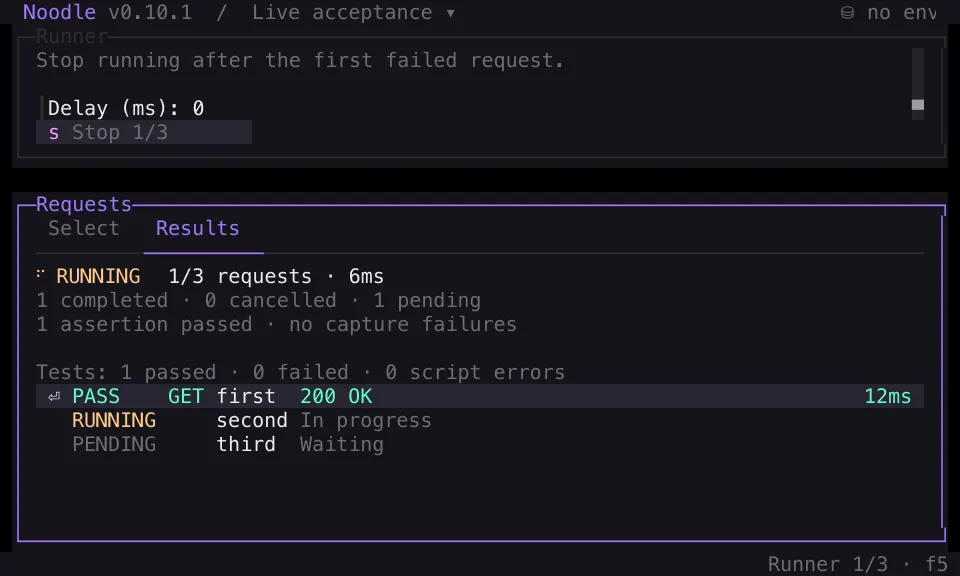
Select a completed row and press Enter, or click it, to inspect its response, script, capture, assertion, and test outcomes. Console remains available when logs exist. Tab and scrolling continue to work during execution, including in compact 80 by 24 terminals.
Stop, browse, and return
Press s in the Runner or its result detail overlay, click Stop, or activate the focused Stop action with Enter or Space. The command palette also offers Stop Collection Run. The stopping state remains visible until cancellation and cookie cleanup finish.
Completed results and finished diagnostics stay available. Cancelled executions remain distinct from failures and selected requests that never started. Stop cannot undo HTTP effects already sent.
Press Escape to browse elsewhere while the run continues, then F5 to return to the current workspace’s live, partial, or final results. Read-only navigation and appearance controls remain available. Execution-affecting edits, additional sends, collection switches and reloads, and environment, cookie, or transport changes stay locked until cleanup finishes.
Results stay in the current Runner workspace until a new run or workspace reset. They are not saved as per-collection history or retained on disk. Read the Collection Runner guide for the full workflow and controls.
Recover abandoned cookie locks safely
Cookie jar and encryption-key locks can recover automatically after a confirmed owner process exits. Recovery requires valid owner metadata, preserves existing cookies and stored keys, and keeps an abandoned-lock backup. Live or uncertain owners stay locked; a lock’s age is never enough to reclaim it. Environment transaction locks keep their existing manual recovery workflow.
Windows also retries temporary lock-directory creation contention while preserving persistent filesystem errors. See cookie storage guidance before considering a session reset.
CI and release jobs now use Bun 1.4.3 with matching artifact metadata. Runtime
and development dependencies are refreshed, while OpenTUI remains pinned to
0.5.14. The maintained noodle-dev and noodle-use skills cover the changed
Runner and cookie workflows. Read the
full changelog
for the release details.